Exploring the Workspace
Overview
When you first log in, you’ll land in the main workspace. This is your workspace for building, managing, and customizing your site.
The workspace is divided into two key areas:
- The ■ left navigation sidebar for quick access to tools.
- The ■ main dashboard area for shortcuts and an overview of features.
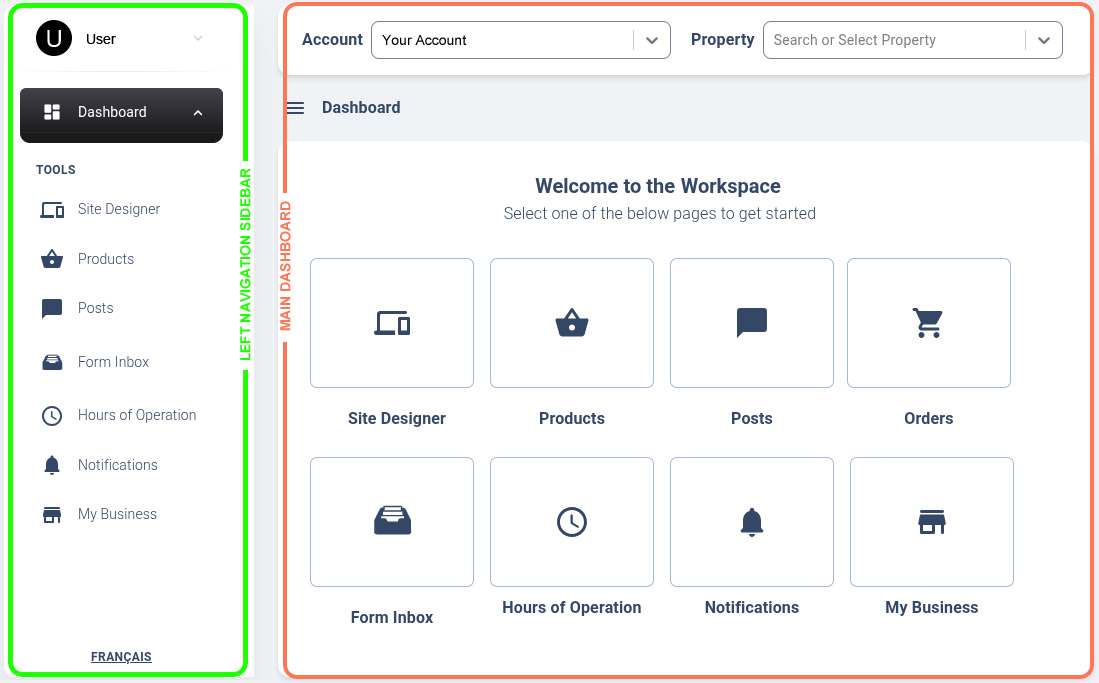
■ Main Dashboard
Account Dropdown
- If you have multiple accounts under the platform, you can switch between them here.
Property Selector
- For businesses with multiple locations or properties, this dropdown lets you choose which property to manage.
Tools
Tools at a Glance

Site Designer
Bring your site to life with drag-and-drop design.

Products or Menu
Showcase and manage your products, services, or menu.

Orders
Stay on top of every customer order with ease.

Posts
Share blogs, events, jobs, and news in seconds.

Form Inbox
Capture and follow up with leads from forms.

Hours of Operation
Keep your business hours and closures always up to date.

Notifications
Get alerts your way: email, SMS, calls, or app.

My Business
Control your business details, taxes, and payment preferences.